
If you want to get more out of coding agents than most people do, you need to understand what game you are actually playing in each session.
And the game is not just “write better prompts” or “install more tools.”
The real game is preserving useful context.
Context is king
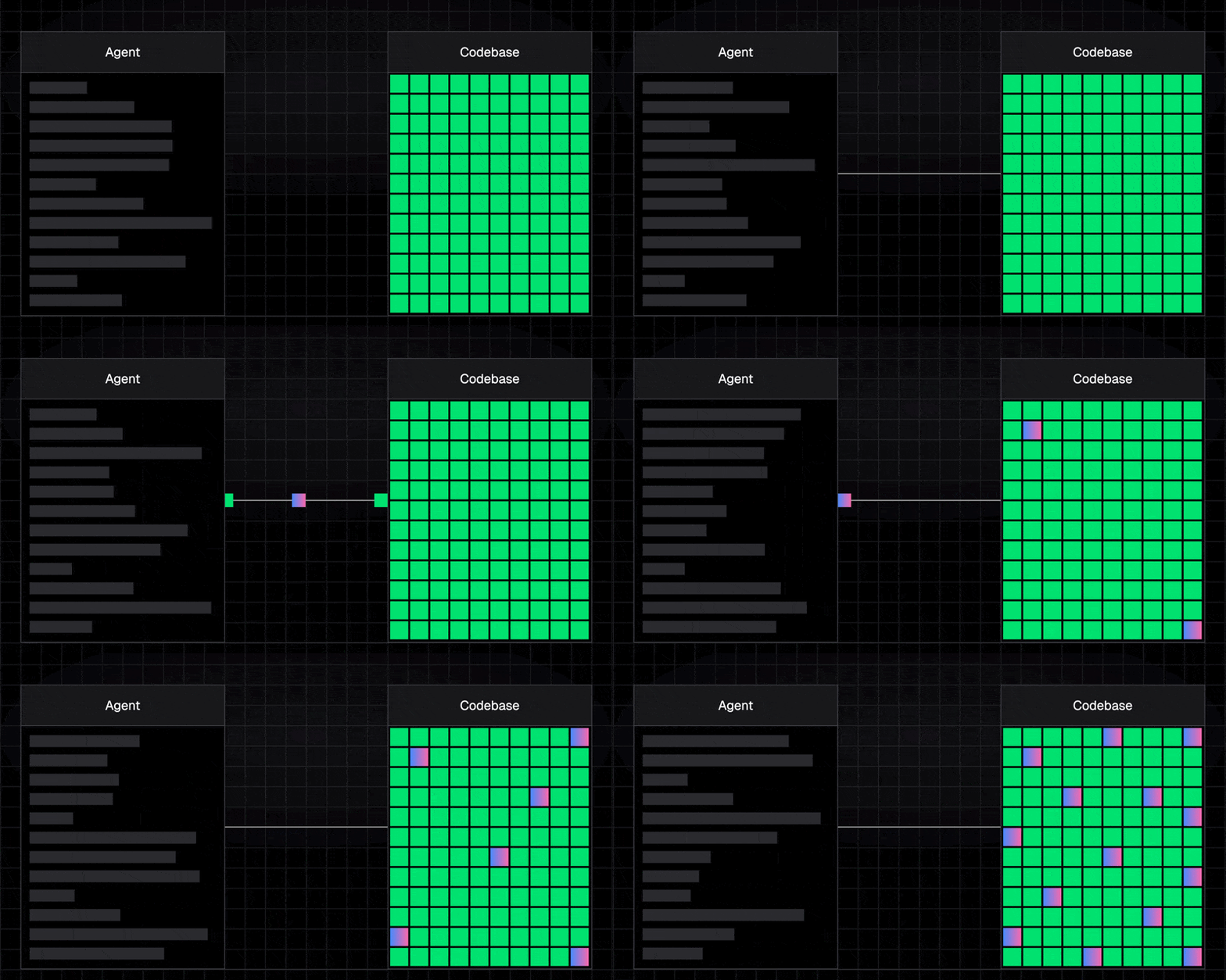
For me, that is the main job every time I start a new session with an agent. Manage the context window well, spend it on the things that matter, and stay as far away as possible from filling it with noise too early. Once that starts happening, output quality drops. And if you use these tools for software work every day, that is how you end up generating slop, and worse, shipping that slop into your codebase.
Twitter (X) - @asidorenko_ link post
Before going further, when I say “AI agent,” I mean something simple: an LLM that can call tools, get results back, and keep iterating in a loop.
If that is the model we are working with, then each session becomes a resource-management problem. The agent has a limited amount of working space, and we decide how that space gets used. The tricky part is that a fresh session is never really empty. By the time you start asking for real work, some part of the context window is already taken by the system prompt, tool definitions, project rules, references, MCP servers, and whatever else the host brings in. The session does not begin at zero. It begins with part of the room already occupied.
That is why I like the way this talk frames the problem as the “smart zone” and the “dumb zone”. There is a part of the context window where the model is still sharp, still able to attend well, retrieve what matters, and compose a strong answer. But as the session gets more crowded, the model has to work through more noise, more irrelevant state, and more positional bias. That is when you start moving out of the smart zone and closer to the dumb zone.

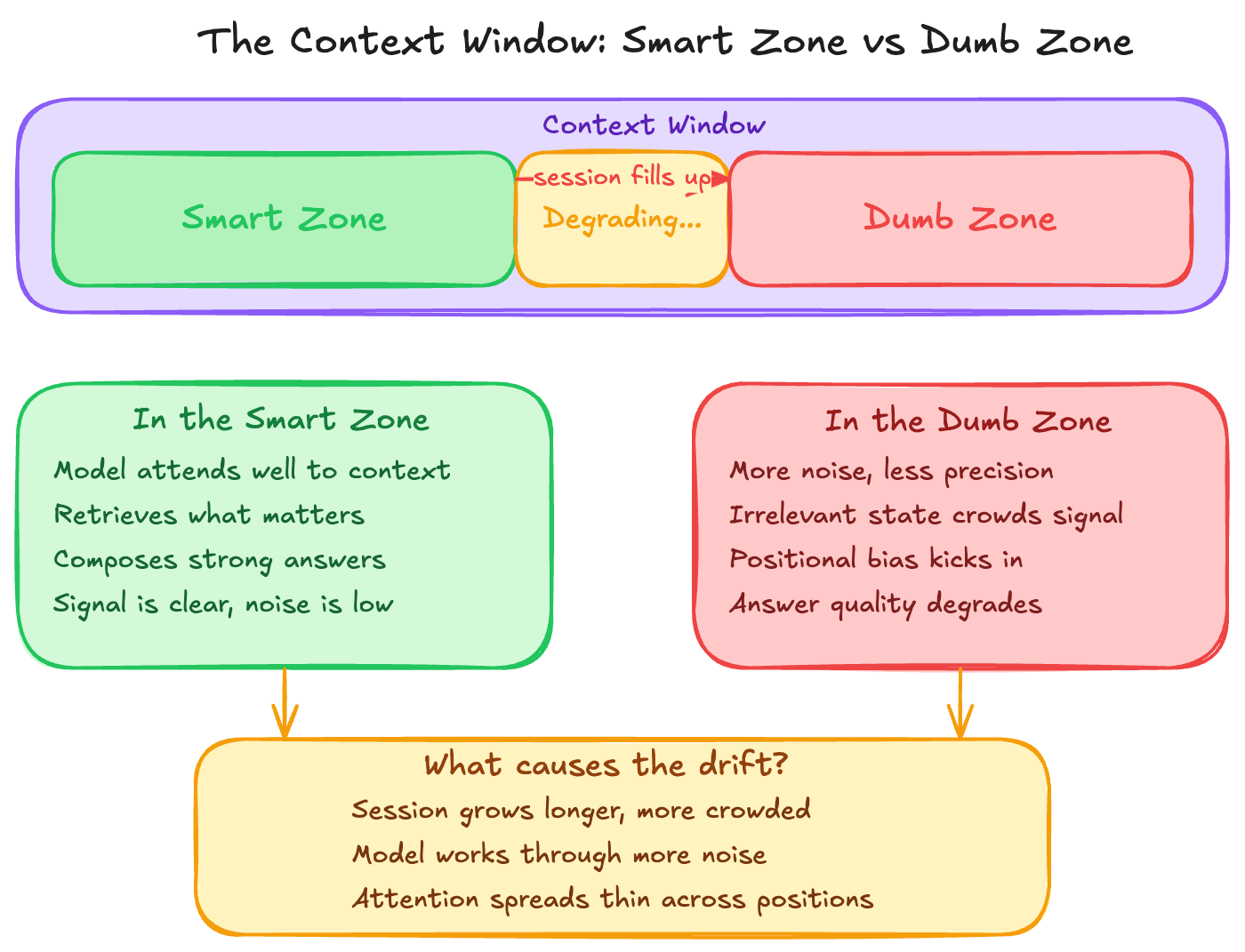
The human version feels familiar. You start your day fresh and use that clear attention on the hardest task first. Most likely the result will be better, not because the task changed, but because your head was still clean. Now compare that with the opposite case: email, Slack, meetings, interruptions, context switching, and only after all of that do you come back to the same hard task. You can still do it, sure, but not with the same clarity. For LLMs, it is similar. A crowded context window does not make the model useless, but it does make it harder for the model to attend, retrieve, and compose from what is actually relevant.
So now the question is: If we know better results come from giving the right context and preserving it, how do we actually do that?
There are many ways to do this better. You can split work across sub-agents so not everything lives inside the same session. You can keep your CLAUDE.md or AGENTS.md tighter so every fresh session starts with less baggage. You can compact sessions when needed, scope the docs you pass in, and get more intentional about what the model really needs in front of it. But in this post, I want to focus on one specific part of that problem:
How we expose tools to the agent, how the agent discovers what is available, and how it invokes those capabilities during a session
Because that design choice changes the amount of structure, noise, and overhead that enters the context window from the beginning. And that is exactly where the CLI vs MCP conversation starts to matter.
Before asking whether CLI or MCP is better, I think we need to ask a more important question first: which one helps us preserve that useful context for longer and when?
What is CLI?
Let’s start with the CLI.
A command-line interface is just a way to interact with a computer or a program by typing commands in a shell. That is it. It is not new, it is not fancy, but it is one of the most direct ways we have to control software.
And that matters a lot for agents, because modern coding agents are already very good at writing and using bash. If the task is “run this command”, “inspect this output”, “call this API”, “write this file”, or “chain these steps together”, the CLI is a very natural primitive. It is mature, composable, scriptable, and already lives in the environment where most development work happens.
Yes, a raw CLI can be rough around the edges. Discoverability is not always great, auth can be awkward, and some tools were never designed with LLMs in mind. But that does not change the core strength of the primitive: the CLI is optimized for direct execution.
What is MCP?
Now let’s look at MCP.
MCP is a standard for how AI hosts, clients, and servers communicate so a model can access tools, resources, and prompts through one reusable interface. Under the hood there is protocol machinery there, sure, but the important part for this post is simpler than that: MCP is trying to give AI systems a structured way to discover capabilities and use them without every integration becoming its own custom one-off.
So while the CLI feels like an operator interface, MCP feels more like a platform interface. Instead of saying “run this command in the shell”, you expose a tool, a resource, or a prompt in a shape the host and the model can understand more consistently.
That is why MCP gets interesting when the problem is not only execution, but also structured access, reuse, and interoperability across multiple AI clients.
Why do both exist?
This is the part I think people skip too quickly. If the CLI is so good, then why does MCP exist at all?
Because they are not solving the exact same problem.
The CLI exists because text commands are still one of the most efficient ways to control software. That is true in development, infrastructure, cloud workflows, CI, scripting, and remote environments. If you know what needs to be executed, the CLI is hard to beat.
MCP exists because AI systems are usually isolated from the tools and data they need, and building a different custom connector for every host, every tool, and every source does not scale very well. So MCP is trying to turn those fragmented integrations into a shared contract.
So for me the distinction is not old vs new. It is not “legacy interface” vs “AI-native interface” either.
It is this:
- CLI solves control of software.
- MCP solves standardized connectivity between AI systems and external capabilities.
The real difference: execution vs context architecture
This is where the comparison finally becomes useful.
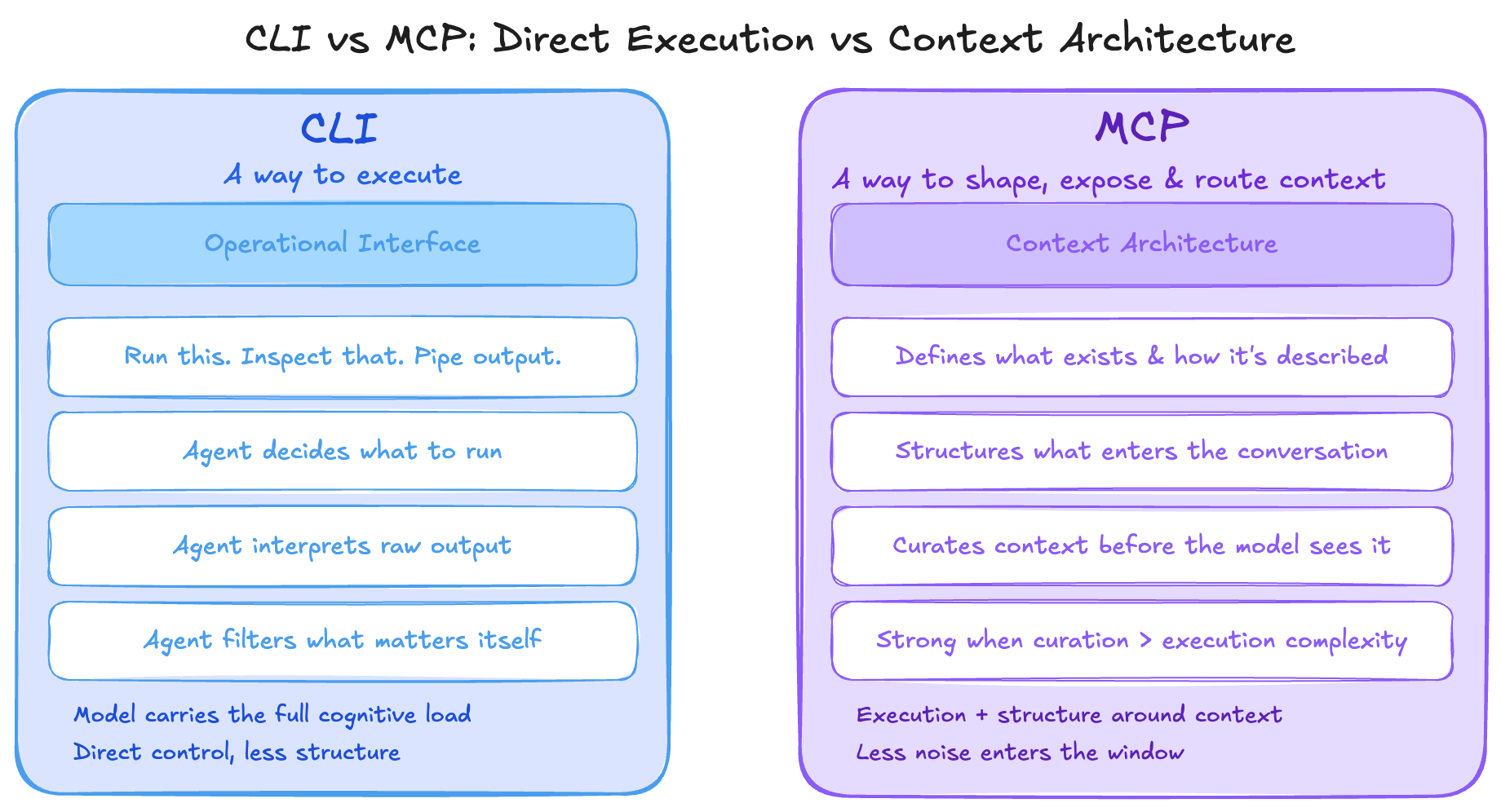
CLI is mainly a way to execute.
MCP is mainly a way to shape, expose, and route context for an agent.
With a CLI, you are mostly giving the agent direct control. Run this. Inspect that. Pipe this output into the next step. It is a very operational interface. The model still has to do more of the work of deciding what to run, how to interpret the output, and what part of that output actually matters.
With an MCP server, you are not just giving the agent execution. You are also giving it structure around what exists, how it is described, and in some cases how much raw information even needs to enter the conversation in the first place. That is why MCP can be strong when context curation becomes harder than command execution.
So if I had to compress the whole article into one line, it would be this: the real difference is not command line vs protocol, it is direct execution vs context architecture.
Trade-offs
And this is where software engineering goes back to being software engineering: trade-offs.
Context cost
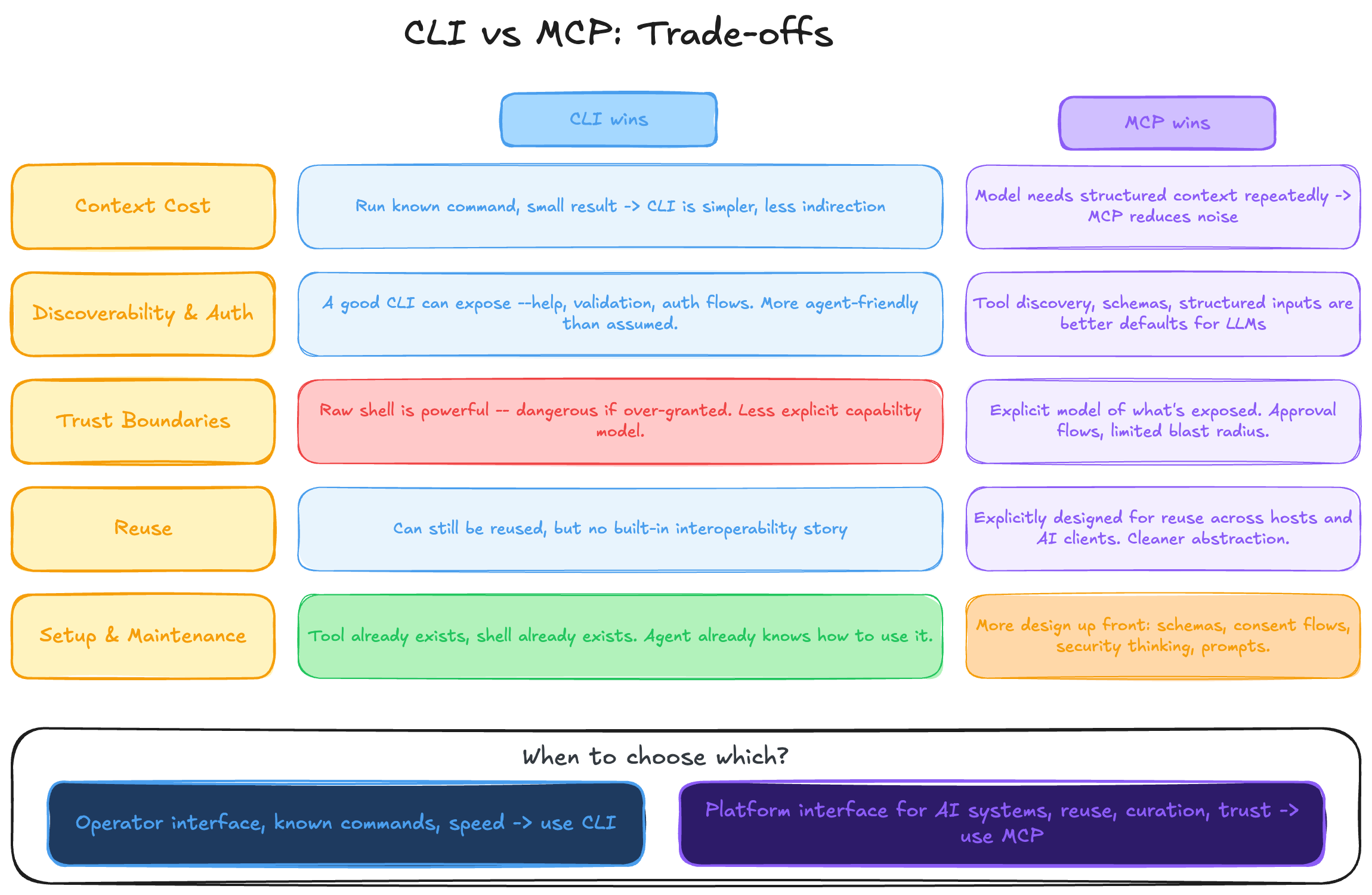
If the task is mostly “run a known command, inspect a small result, and act”, CLI is often the simpler primitive. Less architecture, less indirection, less ceremony. But if the problem is that the model keeps needing structured context, curated data, or reusable resources, MCP can start winning because it can reduce how much noisy information has to be shoved into the main thread.
Discoverability and auth
This is one of the most common arguments in favor of MCP, and it is a fair one. Tool discovery, schemas, and structured inputs are a better default than handing an LLM a random binary and hoping for the best. But I also think this is where people undersell what a CLI can become. A good CLI can expose --help, examples, validation, and even auth flows. Tools like aurl, for example, show that a CLI can be much more agent-friendly than people assume.
Trust boundaries
A raw shell is powerful, and that power can become dangerous if you over-grant it. That part is real. MCP usually comes with a more explicit model around what is exposed and what the model is allowed to do. So if the main problem is strict capability boundaries, approval flows, or limiting blast radius, MCP has a real advantage.
Reuse
This is another place where MCP makes a strong case. If you want the same capability to be reusable across multiple hosts and AI clients, MCP is a cleaner abstraction. A CLI can still be reused, of course, but MCP is explicitly designed to make that interoperability story better.
Setup and maintenance
CLI usually wins on simplicity. Many times the tool already exists, the shell already exists, and the agent already knows how to work with it. MCP asks for more design up front: protocol shape, consent flows, schemas, resources, prompts, security thinking. That extra structure can pay off, but it is still extra structure.
So no, I do not think this is a clean “one is better than the other” kind of argument. The better choice depends on what problem you are actually trying to solve.
If you want an operator interface, CLI is often the better fit.
If you want a platform interface for AI systems, MCP starts making much more sense.
That is the theory. So I wanted to test what the difference looked like in a real workflow.
Real-world benchmark: Playwright workflow
Objective
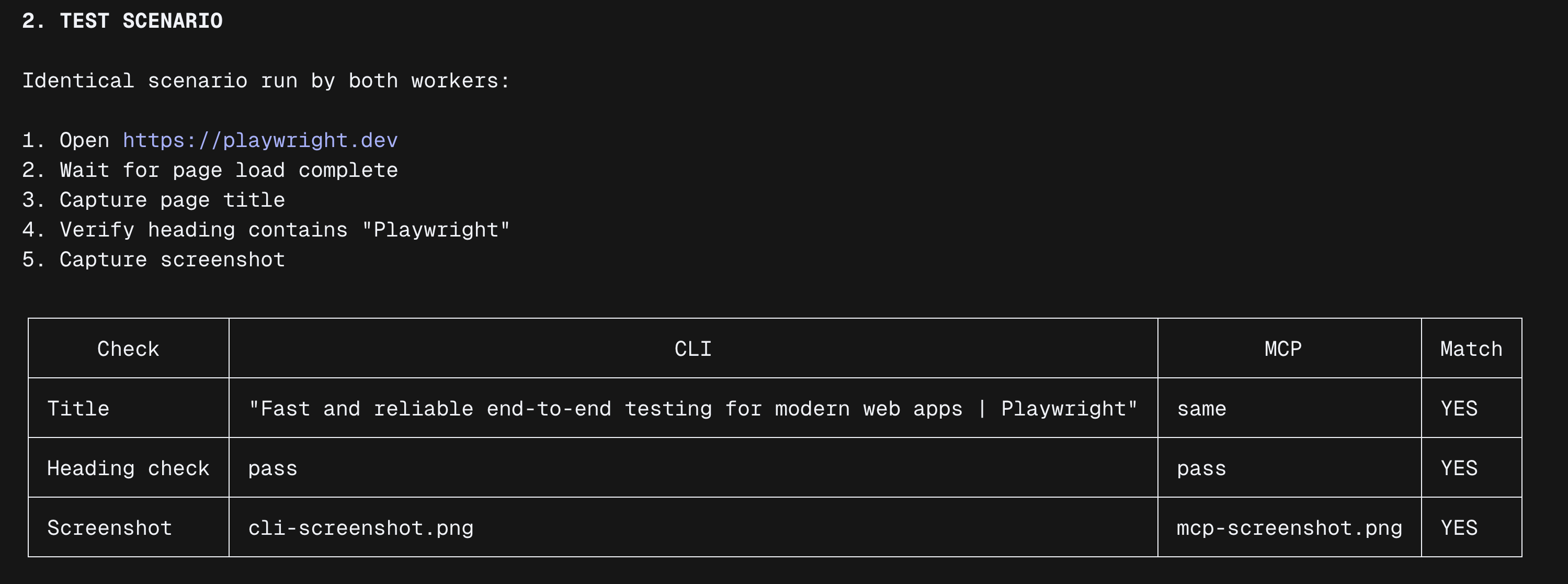
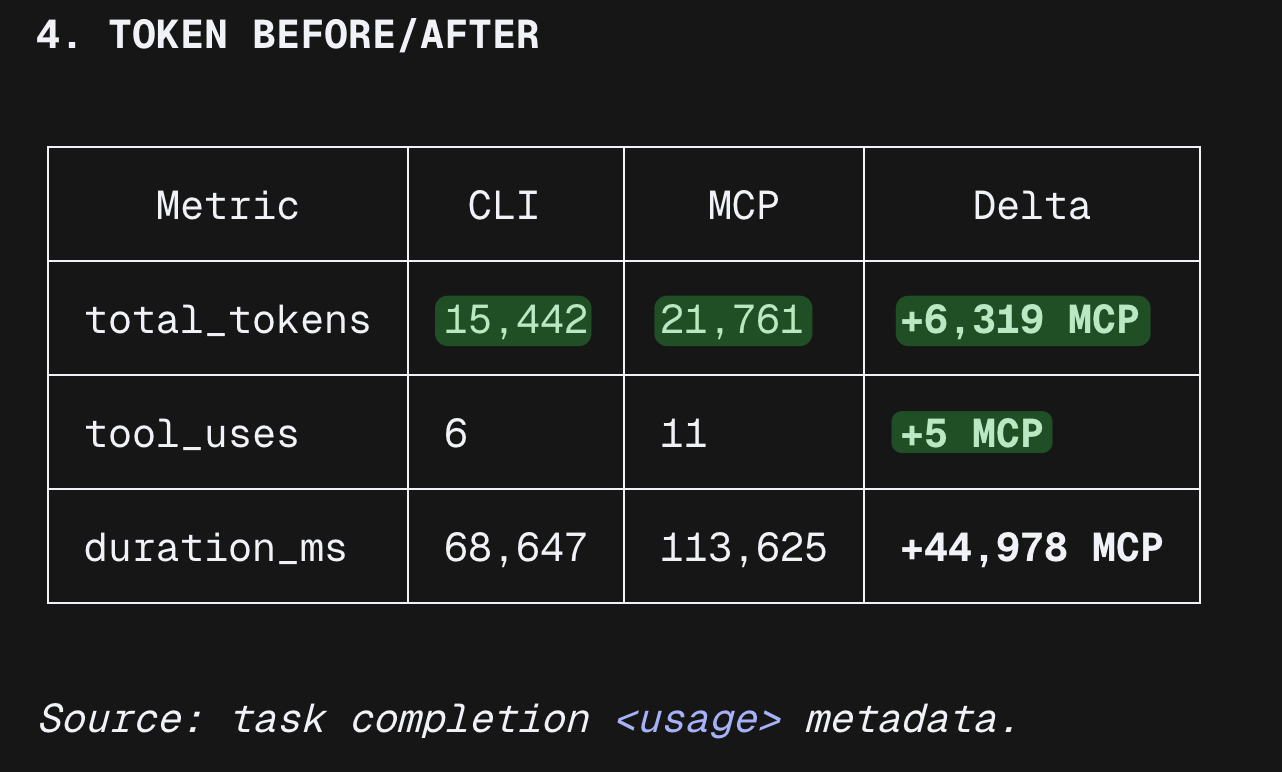
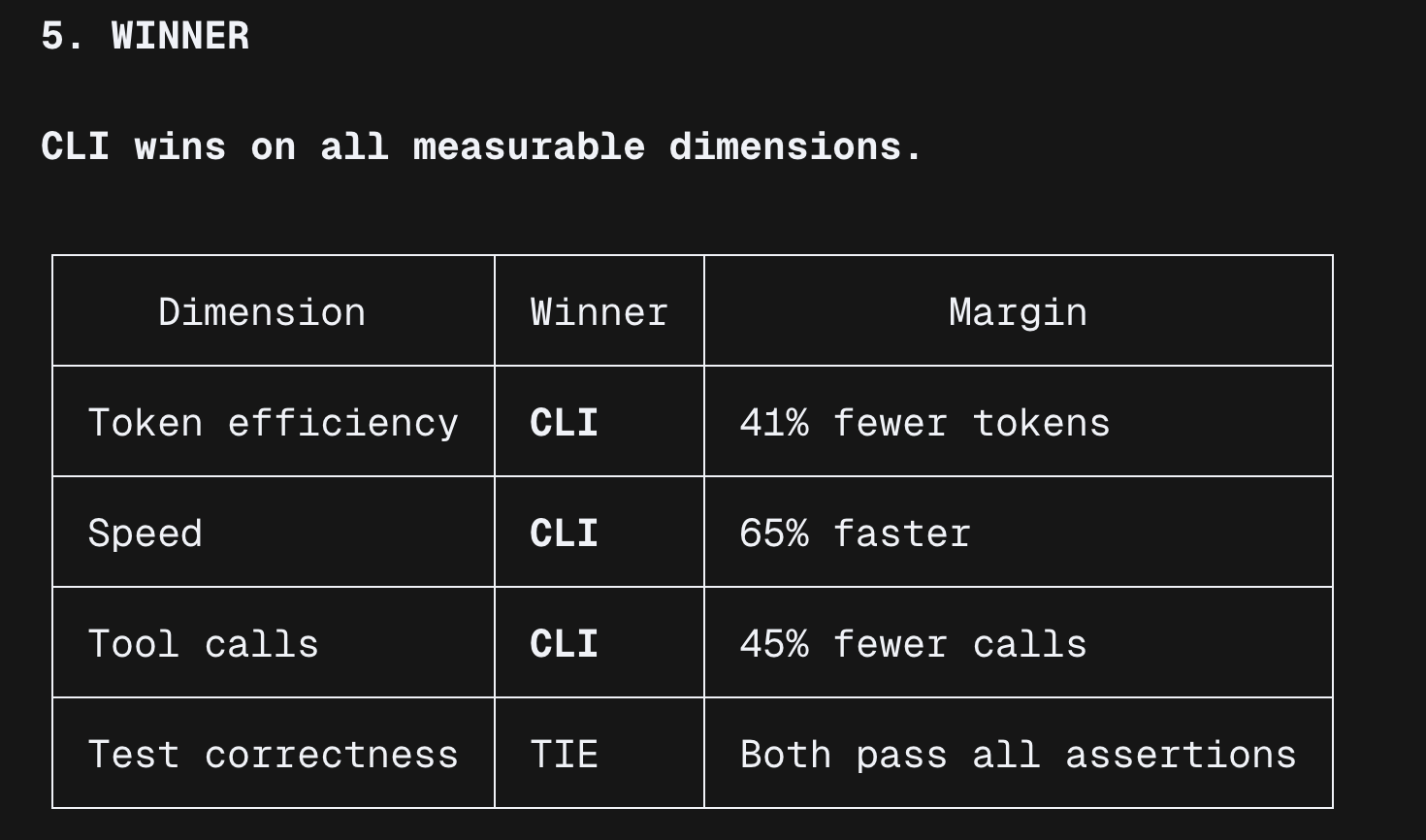
I wanted one example that felt closer to a real workflow than another abstract argument, so I ran the same Playwright workflow in parallel through a single orchestrator agent that delegated to background sub-agents. Then I compared:
- token burn
- context usage pattern
- tool-call count
- workflow friction
- raw context exposure
Orchestrator Prompt (copy/paste, deterministic)
You are the BENCHMARK ORCHESTRATOR.

Objective:
Run a deterministic Playwright benchmark with two background workers (CLI vs MCP), capture token usage before/after, and produce comparable artifacts.

Hard constraints (do not break):
1) Use exactly 2 background worker sub-agents:
   - Worker CLI: `playwright-cli`
   - Worker MCP: Playwright MCP tools path
2) Both workers must run the exact same test scenario.
3) Do not change URL, selectors, or assertions between workers.
4) If a step fails, retry once; if it fails again, record failure and continue.
5) If remaining context is not visible, set it to "unknown".

Token checkpoint format (mandatory, exact):
[TokenCheck] step=<name> input=<n|unknown> output=<n|unknown> reasoning=<n|unknown> cache_read=<n|unknown> cache_write=<n|unknown> total=<n|unknown> remaining_context=<n|unknown>

Execution plan:

PHASE 0 — Setup
- Print orchestrator session id if available.
- Record baseline:
  [TokenCheck] step=ORCH_T0 ...
- Launch both workers in parallel (CLI and MCP).
- Record worker baselines:
  [TokenCheck] step=CLI_T0 ...
  [TokenCheck] step=MCP_T0 ...

PHASE 1 — Execute identical Playwright test scenario in both workers
Test scenario (fixed):
1) Open URL: https://playwright.dev
2) Wait for page load complete.
3) Capture page title.
4) Verify heading text contains "Playwright".
5) Capture one screenshot.

After each step in each worker:
- append one [TokenCheck] line

At end of each worker:
- emit worker summary with:
  - toolCallCount
  - tokenChecks
  - frictionNotes (max 3 bullets)
  - rawContextExposureNotes (max 3 bullets)
  - extractedResults (title, heading check, screenshot path)

PHASE 2 — Artifact output
- Save worker logs:
  - ./benchmark-artifacts/playwright-cli-run-output.txt
  - ./benchmark-artifacts/playwright-mcp-run-output.txt
- Save merged outputs:
  - ./benchmark-artifacts/benchmark-summary.json
  - ./benchmark-artifacts/benchmark-report.md

PHASE 3 — Final output format (strict)
Print exactly these sections:
1) "RUN STATUS"
2) "TEST SCENARIO"
3) "TOKEN INSTRUMENTATION"
4) "TOKEN BEFORE/AFTER"
5) "WINNER"
6) "ARTIFACTS"

Important:
- Be deterministic and concise.
- Do not modify the test scenario.
- Numbers first, interpretation second.

Execution notes:
- Run both workers concurrently.
Result


Why
- CLI shells out to a Node.js subprocess, so one script executes all browser steps and returns a single result.
- MCP routes every browser action through the model as a tool call, injecting accessibility snapshots and base64 screenshots into context on each step.
For static, pre-scripted test scenarios, CLI was more efficient in this benchmark. MCP starts to make more sense in adaptive workflows where the model has to react to live page state as it goes.
My position
So where do I land on this today?
I do not think MCP is unnecessary, and I do not think CLI is automatically better in every case. If the problem is shared integrations, structured discovery, tighter capability boundaries, or reuse across multiple hosts, MCP is doing real work. That is exactly the kind of problem it was designed to solve.
But for the kind of agent workflows I care about most right now, I usually lean CLI.
Most of my day-to-day use does not look like “design a reusable interface for many AI clients”. It looks more like “run this command, inspect this result, call this API, change this file, and move to the next step”. In that kind of environment, CLI gives me the shortest path between intent and action. Less ceremony, less abstraction, and usually less extra structure sitting in the context window from the start.
That last part matters to me more than people sometimes admit. If I am already working inside a known environment and the job is mostly direct execution, I want the agent spending its tokens on the task itself, not on extra interface overhead. In those cases, the CLI feels like the better default.
I also think people undersell how far a CLI can go once you make it more agent-friendly. Good help output, examples, validation, auth handling, and clear command design already close part of the gap people usually attribute only to MCP. And once you combine CLI with well-scoped agent skills, you get something I personally like a lot: direct execution with lightweight guidance, without forcing every workflow into a heavier abstraction first.
So, just to double check and verify the opinions of others, when I was running the test that e already saw, you find an explanation from the Playwright docs answering the same question of this whole post:

Link ( 04-10-2026 )
So my position is not “always choose CLI”. It is simpler than that: if the problem is mostly about operating software inside a known environment, I start with CLI and only reach for MCP when the integration problem is actually bigger than the execution problem.